

Why doesn’t Brify auto-extract a transcript from a YouTube link?
Why we respect YouTube policies, why unofficial auto-extraction can be unstable, and the fastest way to copy a transcript yourself.
One question we hear a lot is:
"Why can’t Brify just auto-fetch the transcript from a YouTube URL?"
Short answer: because we respect YouTube’s policies.
1) We respect platform policies
YouTube content and data are governed by platform rules and terms. At Brify, we prioritize long-term trust and compliance over short-term convenience.
A policy-gray workaround might feel convenient at first, but it can easily create reliability and trust issues later.
2) Unofficial transcript extraction is often unstable
YouTube’s UI and response formats can change at any time. When tools rely on unofficial libraries, teams often run into problems like:
- Sudden extraction failures
- Inconsistent results across videos
- Features breaking without warning
We chose a workflow that is dependable every day, not one that works only sometimes.
3) The good news: copying a transcript is very easy
In most cases, this takes less than a minute:
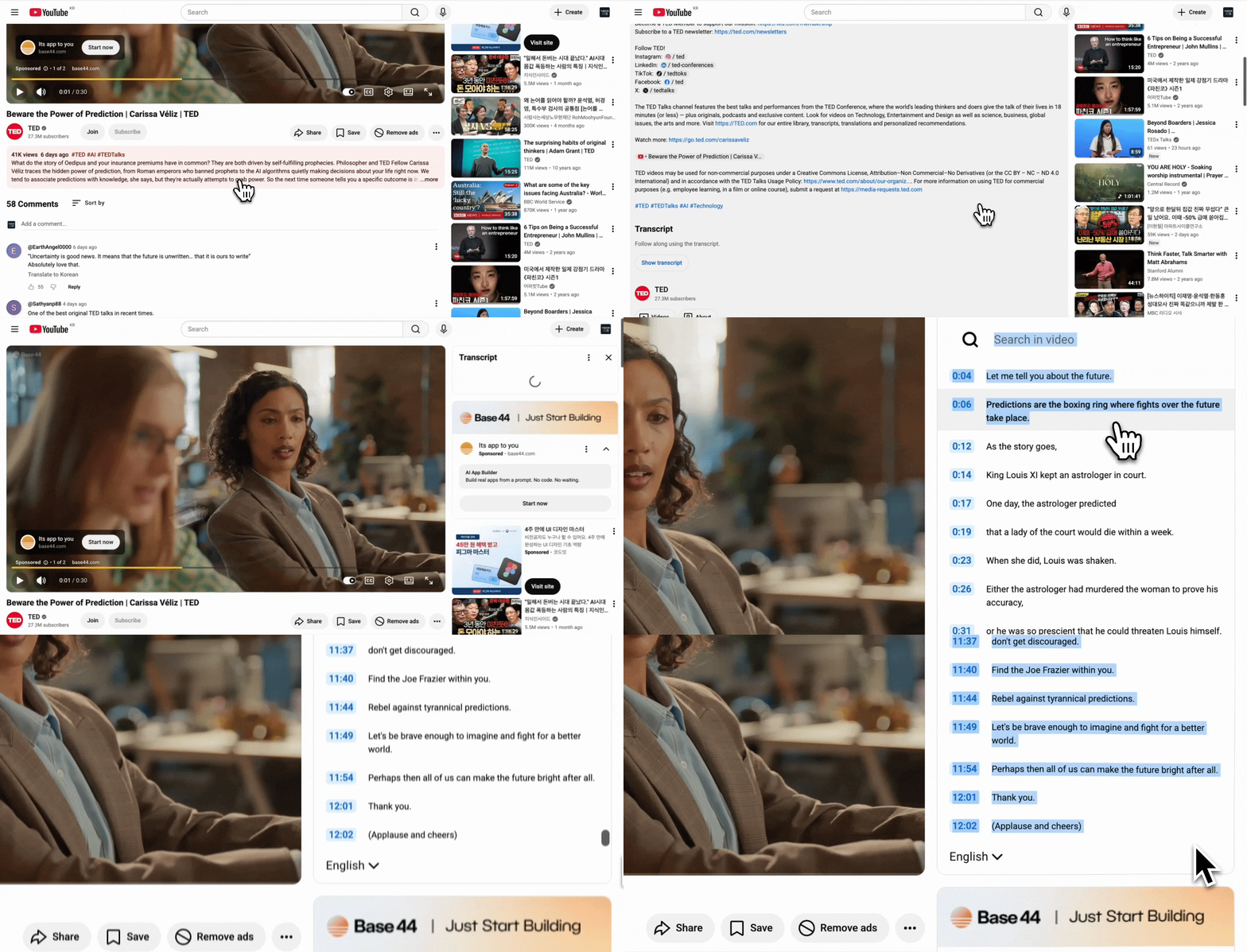
- Click the first word in the transcript (or start selecting there)
- Scroll down to the end
- Hold Shift and click the last character
- Copy the full selection
Note: On mobile, YouTube may not fully support transcript copy workflows. We recommend doing this on desktop for a smoother experience.
So even without auto-extraction, the actual workflow is still fast and stable.
Don’t let good videos slip away
We all save videos from thumbnails thinking, “I’ll watch this later.” But when time is tight, those videos are easy to miss.
Now you don’t need to watch every minute.
Paste the YouTube transcript into Brify, and you can quickly organize key flow and important details into a mind map.
There are many tools that summarize content. Brify’s strength is that it helps you keep important details, not just the headline points.
You can instantly add your own thoughts, notes, and highlights, save them, and share them right away.
Don’t miss useful information just because you’re short on time.